
Read SatFish Charts and True Color in Your Own Browser
Drop in a screenshot of your temperature chart and the colours are measured on your own device: where the strongest break in the water runs, which side is cooler, which is warmer, the pockets, and the closed patches worth a pass on the way by. The enhancer takes a temperature chart or a SatFish true-color shot and pulls the water apart either way. Then do the same with your current chart: where the fast water runs, and the line where it meets the slow. The pictures never leave your phone or laptop, and nothing on this page is charged for.
Why I built this Chart Reader Enhancer
Back when I was starting out, my biggest struggle with reading charts was dialing them in.
The water was right there on the screen, but I could not pull the shades apart enough to see what the chart was telling me, and that is the part nobody hands you.
So I built the enhancer, and it started with the true-color imagery.
The job there was finding the clean water: the good blue water, and the edge where it meets the green.
Once that worked, I took it one step further and gave the same treatment to the temperature charts and the currents.
That is when the whole world of sea-surface temperature analysis got a lot easier, and it is the short version of why it sits on this page free.
What the pros do, and why you get this free
The companies that sell fishing analysis charts do not get better pictures than you do.
They take the same satellite shots anybody can download, then clean them up on a computer: pull the shades apart so your eye can see where one body of water ends and the next one starts, and run a program that draws the seam line for them.
The program is no secret. It is called Cayula-Cornillon, it was written in 1992, and scientists still use it. When researchers checked the lines it draws against real water measured from ships, the two matched.
The one habit worth copying: a pro never stretches a picture that carries no scale. The speed bar on a current chart, 0.0 to 4.0 knots, is that scale.
Stretch a picture with no scale on it and camera noise can turn into a seam that is not really there.
This page does that same work on your own screenshot, on your own device.
The enhancer pulls the shades apart and the seam tool draws the line, and nothing leaves your machine.
One honest limit: an enhancer shows you where to look, not what is there. Look twice, tomorrow's picture or a second sensor, before you bet a trip on a seam.
Honest About What This Enhancer Can Do
Reading a water-temperature chart is a skill, but it can be easily learned if you have the right tools. This beginner analysis tool teaches the mechanics: read the color bar, find the hardest edge, look for eddies and upwelling, and notice what the picture cannot show. That is a real start, and with practice it carries most people a long way.
It is not a substitute for training. Yes, in the past the strongest chart readers tend to be marine scientists and oceanographers who studied how the ocean actually moves, and captains who spent years comparing what a chart showed them with what they found on the water.
That knowledge comes from coursework, from mentors, and from a long record of being wrong and making adjustments. For most people a web page itself cannot just hand that over.
Treat broad claims about interpretation with care. Some products suggest that reading satellite imagery needs no training at all. That framing does not hold up on its own. Software is good at showing you where the colors change and where something worth a look is sitting, and that is genuinely useful.
Deciding what those features mean for the water underneath them, and for one particular day of fishing, is interpretation. Interpretation leans on oceanography, on the local record and on time on the water.
It goes further when someone who has studied those things is in the conversation.
Use this SST Enhancer page to help learn the language. Then keep practicing. Fish with people who read charts well. Ask why they picked the line they picked.
Keep a log of what the chart said against what the water actually did. Read the science when you can.
That is my honest advice, and it is worth testing against your own experience.
True-Color, SST and Current Image Enhancer
Upload a screenshot here and it lands in this panel. Boost the green, sharpen the edges and pull the seam overlay up to see where one body of water meets the next. It works the same on true-color imagery: a SatFish true-color screenshot loads straight in, and there the saturation, contrast and edge sharpening do the work instead of the green boost. All of it runs in your browser — the enhancer never sends the picture anywhere.
Temperature chart or true-color imagery, including a SatFish true-color shot. Both upload and enhance the same way.
Amplifies green water mass visibility
Color intensity boost
Lower = more blue contrast vs green
Edge definition at color boundary
Lifts mid-tone color signatures under thin cloud
Sharpens green/blue boundary contrast through cloud
What to Look For
Move a slider and the picture updates as you go. Zoom in to read the small detail, then drag the picture to move around. Save the enhanced copy with the button at the top.
Copyright warning — Good Karma Sportfishing
This tool copies nothing. The picture you load is shown on your own screen and stays there. It is never uploaded, never saved to this site, and never shared with anyone.
The charts themselves belong to whoever made them. A SatFish or any other paid chart screenshot is that company's copyrighted work, so read it, learn from it, and do not repost it or pass it off as your own. What you learn here is yours to keep. The chart picture is not.
The enhancer itself is proprietary to Good Karma Sportfishing. The tool, the way it enhances a chart, and this page were built by and belong to Good Karma Sportfishing, so please do not copy it, clone it, or offer it as your own without permission.
Copying is considered bad karma, and bad fishing luck for ya :)
The South Florida SatFish Intensive
$200.00 · Three recorded lessons plus a recorded Q&A.
Learn with Capt. Ryan and Dr. R. Jeffrey Barr, SatFish's Chief Scientist and Head of Product.
Jeff holds a PhD in marine biology from the Joint Doctoral Program at UC Davis and San Diego State University, where he specialized in using oceanography and bottom structure to understand fish population dynamics and make predictive models for fisheries management.
Covers temperature breaks and layers, chlorophyll, eddies, currents, and bottom structure for South Florida bottom fishing and wahoo.
SatFish True Color, and why I rank it first
The True Color option is not a color-coded model and there is no legend to translate: it is the actual scene, in the colors your eye would see from up there.
Deep blue is clean Gulf Stream water. Green and olive is shelf water.
Brown or milky patches are stirred-up bottom or a bloom, and white is cloud.
Why I rate it the best picture you can get: nothing sits between you and the water.
A temperature chart shows you what a computer worked out the water probably is.
A current chart shows where a model expects the flow to go.
True color just shows you the water, and you read it the same way you read it off the tower, only from a thousand miles up.
The clean blue is where the pelagics are hunting, and the edge where blue meets green is where the bait stacks. You can see that edge with your own eyes.
The colors I look for:
- Deep blue: clean, warm ocean water, the blue-water bite.
- Green or olive: shelf water, and the green side of the edge holds the bait.
- Brown or milky: stirred-up bottom or a bloom, often sitting right on a seam.
- White: cloud, and cloud hides everything underneath it.
You are in good company on that.
The true-color picture on the evening weathercast comes down from NOAA's GOES satellites, and NOAA builds it to be enhanced, in their own words, so the clouds, the clear sky and the water stand out from each other.
That is the same job the enhancer above does on your screenshot, aimed at the water instead of the weather.
Then run it through the enhancer above.
Blue and green sit close together in a true-color shot, and pulling the shades apart is exactly what makes that edge pop.
That is why I built the tool in the first place.
One honest catch: cloud. A solid deck of it wipes out the picture, and on those days the temperature chart is the better read. And true color is a snapshot, not a forecast.
It shows what the water looked like when the satellite went over, not where it will be tomorrow.
SatFish, and how to get $20.00 off a year
I am a proud SatFish affiliate. Enter the code goodkarma at checkout on SatFish.com for $20.00 off a yearly subscription.
Not sure yet? Do what I did: start the 30 day free trial, screenshot your charts, and run them through the enhancer above to speed up the learning curve.
Want the whole read taught step by step? That is what my course below is for.
Enhance SST Charts and the Current Charts
A current chart shows where it is going, and how hard: the colour scale is speed, the small dark arrows are direction, and the thin lines are the depth contours the flow follows.
Read the legend first, then drop your current chart image into enhancer
Your browser shades it into the five speed bands and finds the line where the fast water meets the slow, free, like everything else on this page.
Use the enhancer to get dialed in.
The SatFish Current Legend
Every SatFish current chart carries the same color bar, 0.0 to 4.0 knots, slow to fast. Learn the band order once and you can read any of them.
| Shade on the chart | On the bar | What it means | The fishing read |
|---|---|---|---|
| Deep purple and violet | 0.0 kt | The slowest water on the chart — swirl cores, and water lifted up from depth. | The best water on the picture for bait. Fish the edge of it, not the middle. |
| Blue | 1.0 kt | Slow shelf water — the calm side, and the recirculating countercurrent. | The countercurrent and the calm side of the shear line. A predator highway. |
| Light blue, cyan and green | 2.0 kt | Transitional water — where the shelf water starts to get taken by the Stream. | The shear zone itself. Watch this band for the bite line. |
| Yellow and orange | 3.0 kt | The fast Florida Current core — the Stream itself. | Blue-water trolling water. Ride the edge where it meets the purple. |
| Deep red | 4.0 kt | The fastest water the scale can print — the middle of the jet. | The wahoo highway. Troll the red-to-orange edge, never across the middle. |
On the live chart you never have to guess between the shades: the black pill that follows your cursor prints the exact speed at that spot, like 0.36 kts. Read the bands for the picture, and quote the pill for the number.
Read it in this order
1. The arrows — direction
The small dark arrows state which way the surface water is running, so read these first. Parallel and evenly spaced means the flow is clean and straight; arrows that curve, crowd, spread or reverse are a meander, a seam or a swirl.
2. The colors — speed
The shade says how fast, never which way, and only the printed color bar can tell you the numbers. A hard change from one shade to another is a front: two bodies of water pressed together.
3. The contour lines — depth
The thin lines are the bottom, labelled in feet. A boundary current follows the steepest drop, so where the contour bends, the current bends with it. That is why the fast band rides the shelf edge.
The four names that matter
The wall
The boundary between the fast water and the slow shelf water. Wall in means it is pinned against the reef tract and the edge is live; wall out means it has been pushed offshore, with slow water between it and the reef.
The filament
A tongue of slow purple water pulled east out of a swirl by the fast flow, running between the reef shoals and the displaced fast water. It carries the food signal east faster than the swirl itself drifts. Every read names the filament, or says plainly that none is showing.
The countercurrent
The slow, recirculating water that fills the gap when the fast flow has been pushed offshore. It can run against the main flow, which makes holding bottom easier — and where it meets the fast water is the shear line.
The eddy
A closed swirl in the arrow field. Sitting on the reef side of the fast water, it is what shoves the wall offshore, and it holds for days to weeks rather than hours. A small curl on the outer edge usually reinforces the wall instead.
7 Short Tips for Reading the SatFish SST Charts
Seven short SST chart reading tips. Each one ends with something small to do on your own chart, so the habit builds as you go.
The temperature legend, in plain words
Every SatFish temperature chart carries the same color bar, and this is it: cool purple water on the left, warm orange on the right, with the temperature printed at five points along the way, 79.7°F out to 87.0°F.
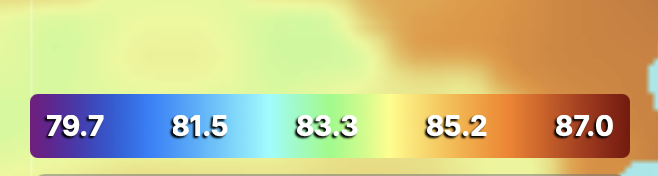
Read it the same way every time. Find the two printed numbers your water sits between, so you know how warm it is, then look for where those shades press hard against each other on the picture. That hard change of color is a front, and the front is where the fishing is.
What you are actually looking at
A temperature picture of the top skin of the sea
- ·SST stands for sea surface temperature. Satellites measure the top sliver of the ocean and paint it in colors.
- ·On a temperature chart the colors mean temperature. Warmer water and cooler water, nothing else.
- ·It is not a depth chart. It is not a current chart. It is not a fish finder. It is a picture of how warm the water is.
- ·Every chart picks its own colors, so the same color can mean different things on two charts. That is why the color bar matters so much.
Do this on your own chart: Cover the color bar with your hand. Guess which water on the chart is warmest, then uncover the bar and check yourself.
Read the color bar first, the picture second
The legend is the whole vocabulary of the chart
- ·The color bar tells you three things: the units (degrees F or C), the coldest number printed, and the warmest number printed.
- ·That printed range is your entire vocabulary for that picture. On a chart running 74 to 84, a two-degree change is a big deal.
- ·Look at how fast the color changes, not just the color itself. A slow fade and a hard line are two very different pieces of water.
- ·Most charts are a blend of the last day or so of satellite passes, so a soft edge may be several hours smeared together.
Do this on your own chart: Write down your chart's coldest and warmest printed numbers. Put them at the top of the page before you read anything else.
The edge is the whole story
Break, seam, edge, front — all the same thing
- ·An edge is a place where the temperature changes fast over a short distance. Fishermen call it a break, a seam or a front. It is all the same water.
- ·A hard edge means two different bodies of water are pressed right up against each other. A soft gradient means the water is easing from one temperature to the next.
- ·Fish the hard edge. Bait gets squeezed along it and the fish that eat bait work that line.
- ·The middle of a big colored blob is usually the deadest water on the chart. The boundary is where the life is.
Do this on your own chart: Trace the sharpest color change on your chart with your finger. That line is your troll for the day.
Warm pockets and cool pockets
Small blobs that punch above their size
- ·A cool pocket is colder water sitting inside or beside warmer water. It usually comes from deep water being pushed up over a hump or the shelf break.
- ·A warm pocket is bathwater tucked against the reef. It holds bait and it holds the fish that follow bait.
- ·A cool pocket right next to warm water gives you a manufactured edge: two temperatures side by side within a short run.
- ·On the Keys, look for cool pockets at the Islamorada and Marathon humps and along the shelf break. Those are the spots that show up again and again.
Do this on your own chart: Circle every pocket smaller than a thumb on your chart. Rank them by how sharp their edge is, not by size.
Eddies, swirls and filaments
Spinning water and the tongues it pushes out
- ·An eddy is a spinning piece of water carrying its own temperature. On an SST chart it looks like a rounded swirl or blob of one color wrapped in another.
- ·A filament is a tongue of one color stretching away from the blob. On a temperature chart, a cool tongue pushed toward the reef edge is worth a look.
- ·Eddies move and change shape day to day. Comparing yesterday's chart with today's is how you learn the direction they travel.
- ·Where an eddy rubs against faster water, you get shear — and shear is where the edge gets hard.
Do this on your own chart: Open yesterday's chart beside today's. Find one feature that moved and make a rough guess at how far it travelled.
What an SST chart cannot tell you
Knowing the blind spots is half the skill
- ·Clouds. The satellite cannot see through them, so grey, white, blurry and blank patches are missing data, not cold water.
- ·Surface only. SST says almost nothing about what the water is doing fifty feet down.
- ·Time. A daily blended chart is not one moment. It is a best-guess picture assembled from several passes.
- ·Smoothing. Chart processors clean up imagery, and cleanup can soften a real hard edge.
- ·Surface temperature is not current, and it is not bait. It is one clue.
Do this on your own chart: Find one cloudy gap on your chart. Say out loud: that is a blind spot, not a pattern.
Your six-step routine
The same order, every single time
- ·One: read the color bar and write down the temperature range.
- ·Two: find the sharpest edge on the picture.
- ·Three: note the temperature on each side and which side is warmer.
- ·Four: check the wind, tide and current for the day before you commit to a run.
- ·Five: lay your troll along the edge, not across it.
- ·Six: write down what actually happened. Tomorrow's read gets better because of today's notes.
Do this on your own chart: Run the six steps out loud on your own chart. One edge, one plan.
Stop Running to Burned-Out GPS Numbers.
Want more? This is just the start. I was tired of seeing the same old thing, so I built Your Vault.
Your fishing grounds, Your patterns. Your command.
Why do top-tier anglers adapt while everyone else watches the bite die?
You have invested heavily in the vessel, transducers, radar, and fuel.
But high-end electronics only deliver raw data.
They do not reveal where bait is staging right now, or how shifting wind and current will pin fish to a specific piece of bottom relief.
Stop burning fuel on guesswork.
This is not another generic fishing app. This is your private database.
What’s Inside Your Vault
1. Custom Trip Planning & Live Bait Intel
No cookie-cutter forecasts. Get dynamic run plans built around your vessel’s range, home inlet, and seasonal target species.
Dial in from from home as you plan your trip. The level of detail is that good.
2. Micro-Climate & Hydrographic Analysis
Master local wind-against-tide conditions, sea-breeze timing, and barometric trends. Learn to cross-reference raw marine forecasts against actual water behavior.
3. Structural Charting & Proven Numbers
Together, we dissect the contours, relief, and bottom structure across your region, unlocking access to an exclusive database of productive verified(meaning they actually exist) highly productive patch reefs, deep drop, deep reef, wrecks and gulf GPS coordinates and including a few bait spots for Key Largo, Islamorada and Marathon.
4. Interactive Bottom-Fishing Tools
- Location filtering: calibrated to your home coordinates to calculate precise run times, depth strata, and current holding conditions.
- Drift and approach modeling: real-time drift projections that balance wind versus current, so you hit your line and stick the structure on the very first drop.
Private Vault Membership
Fuel prices are not coming down anytime soon.
Included With Your Membership
1. Private 1:1 Location Calibration & Onboarding
A dedicated setup session reviewing your home radius, auditing local bathymetry, and mapping high-probability zones tailored to your boat and fishery.
2. Quarterly 1:1 Tactical Reviews
Deep-dive log audits to evaluate new ground, adapt to seasonal migrations, and set your game plan for upcoming water temp and current transitions.
3. Direct Database Expansion
Need specific data, contours, or resources integrated for your home waters? We build and expand the vault around how you fish.
This is an independent teaching resource for reading temperature charts and for sharpening true-color imagery, and the author is a SatFish affiliate who works with them, which is why SatFish is named on this page. The free reads are built for sea-surface-temperature and surface-current charts, and a chart read by colour is a second glance at your own eye, never a substitute for it.